Working with Server Components in Practice
Let's now move on to the practical aspects of using Server Components in React 19. We'll discuss how to write your own server components, best practices for their use, and how this approach is integrated within popular tools like Next.js.
How to write Server Components?
Creating a server component from a syntax perspective resembles a regular React functional component - it can return JSX, can accept props. The difference lies in the environment in which it will be executed. In practice, server components are most often written as asynchronous functions (because they usually perform asynchronous data fetching inside). Such a component can be placed in any .jsx/.tsx file without special annotations - by default, React 19 treats every component as a server component until we mark it as a client component. There's a convention (originating from RSC demos and sometimes used for readability) to name server component files with a .server.jsx suffix and client ones with .client.jsx, but this isn't mandatory - bundlers rather rely on 'use client' than on the file name.
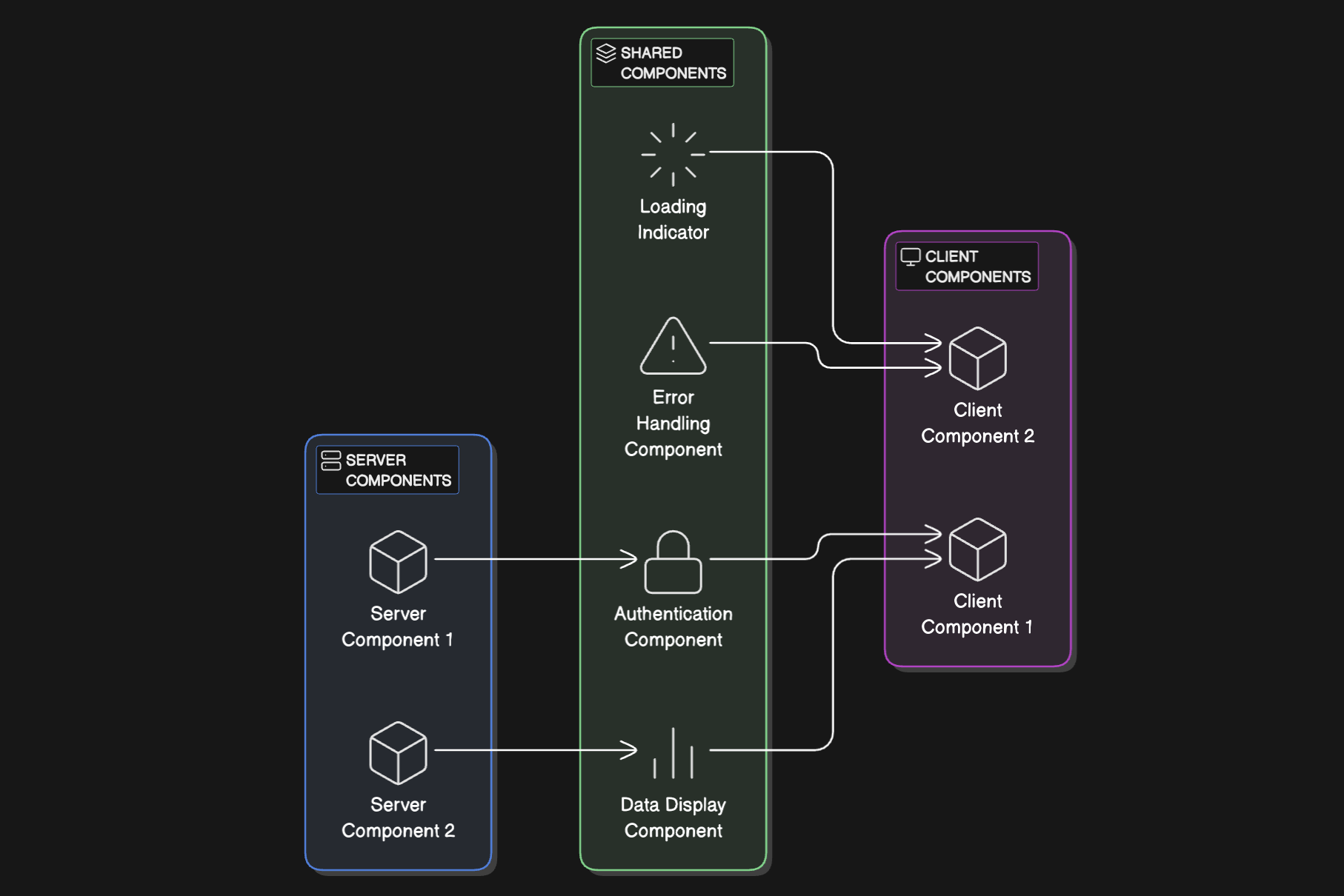
More importantly, avoid using things in Server Component code that are only available in the browser - e.g., window, document, localStorage, etc. - because the component won't have access to them (it will be running, for example, in Node.js). If we accidentally try to import a browser-intended module in a server component, the bundler may report an error. The rule is also that a client component cannot import a server component (because it would try to load its code in the browser). Dependency in the other direction is allowed: a server component can import and render a client component in its JSX - then that client fragment will be treated as a boundary to which the server renders, and beyond which it will leave space for future hydration of the client component in the browser.
Best practices for writing RSC's
From an architectural perspective for React applications with RSCs, a "server by default, client exceptions" approach is recommended. According to React documentation and suggestions from Next.js creators, we should try to maximize the use of server components, and leave client components only for those tasks that cannot be done otherwise. What are these tasks? Mainly:
- User interactions and UI state - wherever we need to handle clicks, form input, browser animations - we must use a client component (because we need
useState, useEffect, or direct browser APIs).
- Using browser APIs - if a component needs to read from
localStorage, use geolocation navigator.geolocation, directly manipulate DOM (e.g., canvas), etc., it must be client-side. Server components have no access to any browser APIs.
- Persistent application state - e.g., a context that stores state between renders will also only exist on the client side. You can of course generate part of the context on the server (e.g., initial state), but further updates require a client component.
In a model React 19 application, it is therefore assumed that a large part of components (especially those responsible for structural rendering of data, layout, lists, tables, articles, etc.) will be server-side, and client components constitute a minority - mainly as "interactive islands" such as buttons, forms, control elements. In server components, we can directly fetch data, connect to a database, read files - that is, do what we previously did in methods like getServerSideProps or useEffect after component loading. Now we can place it _within_ the component itself, which simplifies data flow.
Implementation example
Let's say we're building a dashboard with a user list and a refresh button. We can write a server component UserList.jsx that fetches the user list from the database and renders RefreshButton.jsx that listens for clicks and triggers a refresh action (more on Server Actions in a moment). The server-side UserList can import RefreshButton and place it in its JSX structure.
As a result, the UI will be composed so that the user list is rendered on the server (with current data), and the button will be part of the sent HTML, but it will be marked for hydration - React on the client will attach logic to it after loading the bundle with RefreshButton. For the user, it all looks coherent - they see a list and a working button, but under the hood, React has divided the work between the server (list) and client (button).
Best practice
Keep server components clean, without dependencies on state/effects, and treat them as functions generating a view from data. Client components, on the other hand, should be small and focused on interaction. Such a division minimizes the need for JavaScript on the client side while maintaining the separation of roles.
Here's a more comprehensive example of a dashboard implementation using Server Components:
// UserList.jsx - Server Component
import db from './db' // Server-only database module
import RefreshButton from './RefreshButton'
import UserDetails from './UserDetails'

export default async function UserList() {
  // Data fetching happens directly in the component
  const users = await db.query('SELECT * FROM users ORDER BY last_login DESC')

  return (
    <div className="dashboard-container">
      <header className="dashboard-header">
        <h1>User Dashboard</h1>
        <RefreshButton /> {/* Client component for interaction */}
      </header>

      <div className="user-grid">
        {users.map((user) => (
          <div key={user.id} className="user-card">
            <img src={`/avatars/${user.avatar || 'default.png'}`} alt={`${user.name}'s avatar`} />
            <h3>{user.name}</h3>
            <p>Last active: {new Date(user.last_login).toLocaleDateString()}</p>

            {/* Nested server component - no client JS needed */}
            <UserStatistics userId={user.id} />

            {/* Client component for interaction */}
            <UserDetails userId={user.id} />
          </div>
        ))}
      </div>
    </div>
  )
}

// UserStatistics.jsx - Another Server Component
async function UserStatistics({ userId }) {
  // More data fetching - happens on server, no waterfall effect
  const stats = await db.query(
    'SELECT COUNT(*) as post_count, SUM(likes) as total_likes FROM posts WHERE user_id = ?',
    [userId]
  )

  return (
    <div className="user-stats">
      <div>Posts: {stats.post_count}</div>
      <div>Total Likes: {stats.total_likes}</div>
    </div>
  )
}
// RefreshButton.jsx - Client Component
'use client'

import { useState } from 'react'
import { refreshUsers } from './actions' // Server Action import

export default function RefreshButton() {
  const [isRefreshing, setIsRefreshing] = useState(false)

  async function handleRefresh() {
    setIsRefreshing(true)

    try {
      // Call a Server Action to refresh data
      await refreshUsers()
    } finally {
      setIsRefreshing(false)
    }
  }

  return (
    <button onClick={handleRefresh} disabled={isRefreshing} className="refresh-button">
      {isRefreshing ? 'Refreshing...' : 'Refresh Data'}
    </button>
  )
}
// UserDetails.jsx - Client Component
'use client'

import { useState } from 'react'

export default function UserDetails({ userId }) {
  const [isExpanded, setIsExpanded] = useState(false)

  return (
    <div className="user-details">
      <button onClick={() => setIsExpanded(!isExpanded)}>
        {isExpanded ? 'Show Less' : 'Show More'}
      </button>

      {isExpanded && (
        <div className="details-panel">
          {/* Content shown when expanded */}
          <a href={`/users/${userId}`}>View Full Profile</a>
        </div>
      )}
    </div>
  )
}
// actions.js - Server Actions
'use server'

import { revalidatePath } from 'next/cache'
import db from './db'

export async function refreshUsers() {
  // Server-side logic to refresh data
  await db.runProcedure('update_user_statistics')

  // Tell Next.js to revalidate the current path
  revalidatePath('/dashboard')
}
The key points in this example:
- The main
UserList component is a server component that fetches data directly
- It includes both other server components (
UserStatistics) and client components (RefreshButton, UserDetails)
- The client components are minimal and focused only on interactive parts
- Server Actions are used to perform data mutations from client components
Integration with Next.js
Next.js 13+ (App Router) natively supports Server Components. Writing an application in Next 13, we're essentially using RSC unconsciously - files in the app folder are treated as server components by default (even if they use Next's data hooks like fetch or directly query a database).
If we need interaction, we must add 'use client' at the top of the file, which signals to Next that this module and all its components should be included in the frontend package. Next.js imposes certain rules - e.g., page files (page.jsx) in app cannot be client-side (which is logical, because a page must be at least partially rendered on the server), but inside you can mix client and server components freely. Next takes care of generating two separate bundles during build: one server-side (Node.js) containing all the code including server components, and another frontend one containing only client components. This happens automatically.
In daily work with Next, this means we must keep track of 'use client' directives - for example, if we create a form component and forget to mark it as client-side, Next will report an error (because it will detect the use of useState in a server component).
In other tools, integration with RSC is still in its infancy. Webpack has support for server modules (the browser: false flag in package.json dependencies can indicate that a given package should be excluded from the client bundle). For now, Next.js is the most mature solution that offers out-of-the-box everything needed to use Server Components (routing, bundling, streaming, etc.). React developers have announced that support for RSC will also appear in other frameworks (the React.dev site listed several "bleeding-edge" integrations in progress), but at the time of React 19's release, Next.js was the natural choice for using this technology.
Let's briefly mention Server Actions, as they are closely related to RSCs and React 19. Server Actions are a mechanism for performing actions (e.g., form handling, data mutation) on the server side, invoked directly from a client component through function calls. In practice, it works so that a client component imports a function marked with 'use server' (that's the action) and can call it, for example, in a form's onSubmit - React will then send a package with data to the server, call that function, and then can update the application state.
Server Actions complement RSCs because they handle event processing on the server side. For example, in Next.js 13.4, we can build a contact form that doesn't call any REST API - instead, a server action will directly save the data to the database. However, that's a topic for a separate article; we mention it to show the bigger picture - React 19 is moving towards having both rendering and data mutations happen on the server in a unified way, while maintaining the declarative style of writing components.